Oops! Something went wrong while submitting the form.
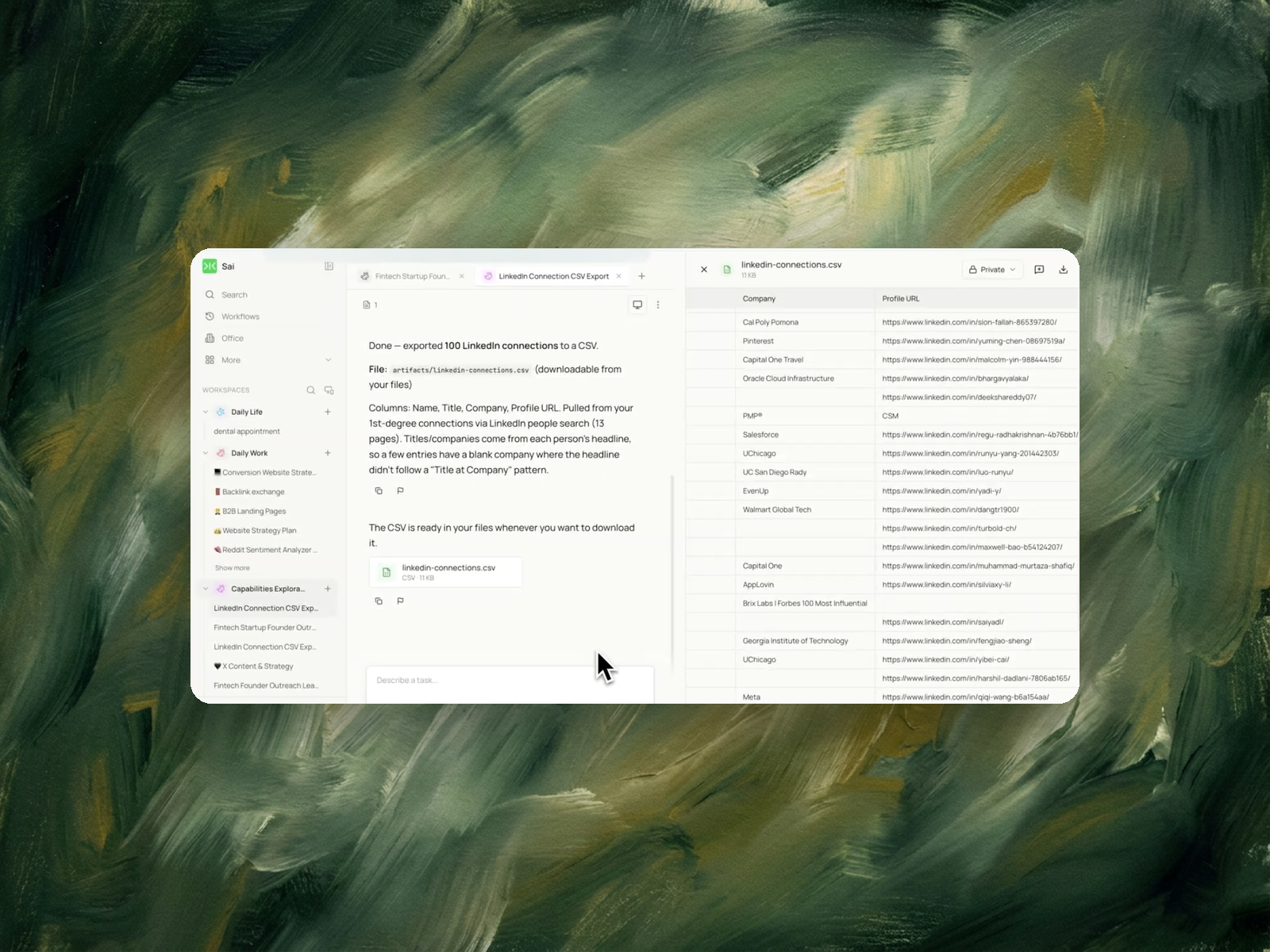
Sai exports your existing connections into a CSV you can actually sort - name, title, company, profile URL. Most people find dozens of warm contacts they forgot they had, sitting one degree away.

The recording is a real session. The sheet on the right is what it produced.
Sai opens each profile, pulls the signal, and writes the row, live, in a real browser.
Eight columns, sorted by score, with a source link behind every claim.
A LinkedIn account you're already signed into. No API key, no session cookie, no automation extension.
A downloadable CSV with one row per connection: name, title, company, and profile URL. Sort it by company to see where your network actually concentrates.
About 6 minutes for 500 connections.
Re-run monthly and Sai reports only the connections that weren't in the last export.
LinkedIn automated connections are connection requests sent by software rather than by a person clicking Connect. Tools in this category take a search result or an uploaded list, then send invitations at a set pace, usually with a templated note and a follow-up message once the invitation is accepted.
The category exists because connection requests are the entry point to LinkedIn's messaging system. A first-degree connection can be messaged without InMail credits, so growing the connection count is the cheapest route to a large addressable audience on the platform.
LinkedIn's User Agreement prohibits the use of bots and automated means to access the service. Enforcement includes rate limiting, invitation restrictions, and account termination. LinkedIn does not publish the numeric thresholds at which restrictions trigger, and the weekly invitation figures circulated in marketing content are inferred from user reports rather than documented by the platform.
Automation also carries an account-level constraint independent of enforcement: pending invitations accumulate, acceptance rates fall as targeting broadens, and a low acceptance rate is itself a signal LinkedIn acts on.
Connection automation starts from a target list — a search, a filter, an uploaded CSV of people to add.
What it does not start from is a record of who is already connected. Most accounts have accumulated hundreds or thousands of first-degree connections over years, and that list is not visible in any usable form. LinkedIn's connections page shows names in an infinite scroll with no sort, no filter by company, and no export button.
The consequence is that automation runs against a target list assembled without reference to the existing network. Two failure modes follow. Requests are sent to people already connected, which the platform silently drops. More significantly, the accounts and companies already reachable through existing connections are not counted, so the campaign is sized against a gap that was never measured.
Growth and sales teams about to run connection automation. The decision of how many requests to send, and to whom, depends on what the network already covers. A segment that is 40% already-connected needs a different plan than one that is 5%.
Founders and operators reviewing their reach. Which companies, roles and regions the network already touches determines who can be reached by a warm introduction rather than a cold request.
Job seekers and recruiters. Existing connections at target companies are the shortest path to a referral, and finding them requires the list to be searchable.
It works inside the browser you're already signed into, so there's nothing to authenticate and nothing to install.
You say how many connections you want and which fields you need. Sai confirms the count, runs LinkedIn's people search, pages through the results, reads each entry, and writes the CSV. For 100 connections that's around thirteen pages of results, each of which has to load fully before the next.
When it finishes you get the file plus a note on what it found - including how many entries came back with a blank company because the person's headline didn't follow a "Title at Company" pattern. Someone whose headline reads "Building something new" has no company to extract, and Sai says so rather than leaving you to discover it later.
Those are connection-request automation platforms. They're solving the opposite half of the problem.
The two aren't really competitors. A sequencer grows your network; this shows you what's in it. The reason to run this first is that it frequently changes who you'd want the sequencer to target.
Once the network exists as rows, lead list enrichment completes fields the profile does not carry.
For prospect lists built from search rather than from existing connections, LinkedIn profile data extraction covers that path, and the two files can be compared to separate new contacts from existing ones.
Where outreach follows, personalized outreach drafting writes from captured fields rather than from a template.
No. This task only reads and exports. Nothing is sent, and no action is taken on your LinkedIn account.
No. There's no browser extension, no API key, and no session cookie to paste anywhere.
Yes. Change what you're asking for in the prompt - your followers, the people in a search result, or the employees listed at a specific company.
Because that person's headline didn't include a company in a parseable form. Sai leaves the cell empty and tells you how many rows were affected rather than guessing.
Yes - ask for a Google Sheet in the prompt and Sai will create one and send you the link.