Arbeiten Sie intelligenter mit Sai
Ein ständig einsatzbereiter KI-Mitarbeiter, der Ihre Arbeit erledigt, auch wenn Sie nicht da sind.
Melden Sie sich für eine kostenlose 7-Tage-Testversion an
Delegieren Sie nach Sai

Sai erledigt Desktop-Aufgaben so einfach wie das Tippen eines Satzes, unterstützt von Das Computeragenten-Framework von Simular.

Schließ deinen Laptop. Holen Sie sich Ihre Zeit zurück. Gehen Sie zurück zur Arbeit.

Funktionen
Einfach, sicher, autonom
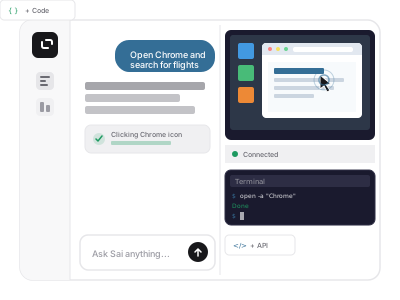
Funktioniert wie ein Mensch auf dem gesamten Desktop
Sai steuert Ihren Computer so, wie Sie es tun: Klicken, Tippen, Bedienen der GUI. Es verwendet auch APIs, bedient das Terminal und schreibt Code. Keine Integrationsbeschränkungen mehr.
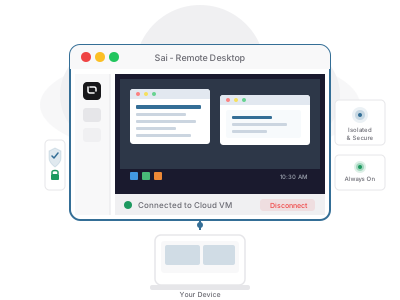
Ihr dedizierter Remote-Desktop oder BYOD
Sai läuft dort, wo Sie es benötigen — auf einer privaten virtuellen Maschine, die wir bereitstellen, oder auf Ihren eigenen lokalen Geräten wie Mac, Windows oder Mac mini.
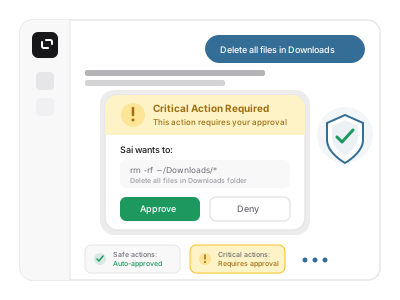
Genehmigungsbasierte Sicherheit
Sai ist bewusst mit Leitplanken ausgestattet, die immer mit Ihnen absprechen, bevor Sie kritische Aktionen ausführen. Keine Überraschungen.
Use Cases

Tailor Resume and Job Application

LinkedIn auto comment

Gmail task + x social media

Word file formatting.

Gmail task + workspace

FAQs

Sai is an always-on agentic AI coworker that can actually do work on a computer for you. Sai can use apps, websites, and desktop interfaces, navigating the graphic user interface (GUI) like humans do. It combines the behavior of an AI agent, an AI personal assistant, and a workflow automation tool in one product. Just describe what you need in plain language, and Sai gets it done with full transparency and built-in safety guardrails. Our vision is to free humans from mundane computer work so they can get back to what matters.

Sai is for anyone stuck doing repetitive, time-consuming computer tasks. Business professionals, founders, researchers, and non-technical users alike use it as a personal AI assistant that does more than answer questions -- it actually gets work done.

You can use Sai for a wide range of digital workflows, including research, lead sourcing, follow-up drafting, scheduling, file organization, spreadsheet updates, document handling, recurring reporting, and other repetitive work across apps and websites. Sai is especially useful for tasks that require real computer interaction.

Sai is designed around four core differentiators:

- A secure workspace where the AI works

- GUI-based computer use, not just browser or API actions

- Approval-based control for important actions

- Always-on background execution so work can continue while you do other things

Many AI agents focus mainly on browser actions, coding, or isolated automations. Sai is built to support broader digital work by combining browser, desktop GUI, terminal, and tool-based workflows in one system, while keeping users in control through live visibility and approvals.

A GUI-based agent is an AI agent that can interact with the graphical user interface of software, meaning it can work with buttons, menus, windows, text fields, and other visible elements on a computer screen. Instead of relying only on APIs or text commands, a GUI-based agent can operate software the way a human user does -- critical for achieving artificial general intelligence (AGI). This allows Sai to handle real-world tools that do not expose clean APIs or require direct on-screen interaction.

Our agentic framework Agent S was the first to outperform human performance on the OSWorld benchmark (https://www.simular.ai/articles/simulars-computer-use-agent-outperforms-humans).

BYOD stands for Bring Your Own Device. In Sai, BYOD means you can use your own device environment to access Sai’s capabilities instead of relying only on the default setup. This gives users more flexibility in how they work with Sai and expands the ways they can use Sai for computer-based tasks.

Sai’s BYOD supports devices including Mac mini, macOS and Windows. Users can download Sai to get it running on their own device environment with control and privacy.

Sai is designed to help users get started quickly without complex setup. You can give Sai a task, choose a workflow, or describe the outcome you want -- all in plain English, and Sai will work inside its secure workspace.

Yes. Sai supports skills, so you can extend how it works for different tasks and workflows. This makes it easier to adapt Sai to more specific use cases rather than relying only on one default behavior. It also supercharges collaboration with the most effective skill shared across a team.

Sai is built with production-grade, enterprise use in mind, with a dedicated digital workspace, approval flows, and live visibility that give teams the safety and oversight of real business demands. No black-box surprises.